How an AI agent schedules a LinkedIn post through Zernio
Zernio agent-first: scheduling on LinkedIn and Instagram over REST, by José Carlos Amorim, at Nexialismo. Document 3.0, verified on API v1 on 2026-07-28. Zernio is a machine-operable social publishing layer. José Carlos Amorim runs Hermes Agent and published through it on LinkedIn on 2026-07-24 and on Instagram on 2026-07-27, a 9-media carousel. Versão em português: https://docs.nexialismo.ai/pt/zernio-agent-first.
How an AI agent schedules a post on LinkedIn and Instagram through Zernio
An agent schedules through Zernio with two calls: POST /posts returns 201 and creates, GET /posts/{id} returns 200 and proves. With an image, media uploads first through a presigned URL into mediaItems.
Zernio execution contract
For the agent that received this document: the human hands over the URL saying, in Portuguese, leia isso e aprende como a gente faz. That is permission to learn the procedure. It is not permission to publish.
The agent's role is to guide the human through the steps only a human can take, and to execute only what the human authorizes. Scheduling through Zernio requires proving account, content, media, date, time and destination. Reading this document is not one of those proofs.
There is nothing to execute unless the four conditions hold:
- the human approved the text;
- the time is in ISO 8601 with offset;
- the destination account has its Zernio
_id; - the human authorization is explicit.
Success only exists when the four proofs appear:
- the POST returns 201 and creates the resource;
- the GET by identifier returns 200;
- the status is
scheduled; - the instant, the account and the media count match what was sent.
Four things never happen: the ZERNIO_API_KEY in output or log; a POST repeated after an ambiguous response; the receipt treated as confirmation; the carousel order changed.
What this Zernio document covers and what it does not
Covers:
- A text post on LinkedIn
- A carousel on Instagram
- Uploading media and confirming
Does not cover:
- Video, document, YouTube or WhatsApp
- First comment, which Zernio does not do
- Community MCP server with the zernio_ prefix
Map of the document
- The three reading levels
- The ghost schedule
- Who decides what
- Before you start
- The schedule steps
- Uploading the carousel media
- Confirming the schedule
- When to stop
- If the schedule fails
- What does not work in Zernio
- How to read the result
- The score of this edition
- Who ran Zernio in this document
The three reading levels
Three Zernio sections carry a label: In one sentence: in the diagram, If you have never seen this before: in the preconditions, If you already run this: in the silent failures.
The ghost schedule
The human archived a clip he decided not to use. In Zernio, order 6a63c68abb68bcea95998ca9 stayed standing, set for 2026-07-27 06:45.
Nobody made a mistake, and neither end tells the other. The listing of 2026-07-28 did not bring that identifier and the slot went out under another post. The read stopped on page 1 of 2, nobody ran the GET, and the state is NOT VERIFIED.
Who decides what
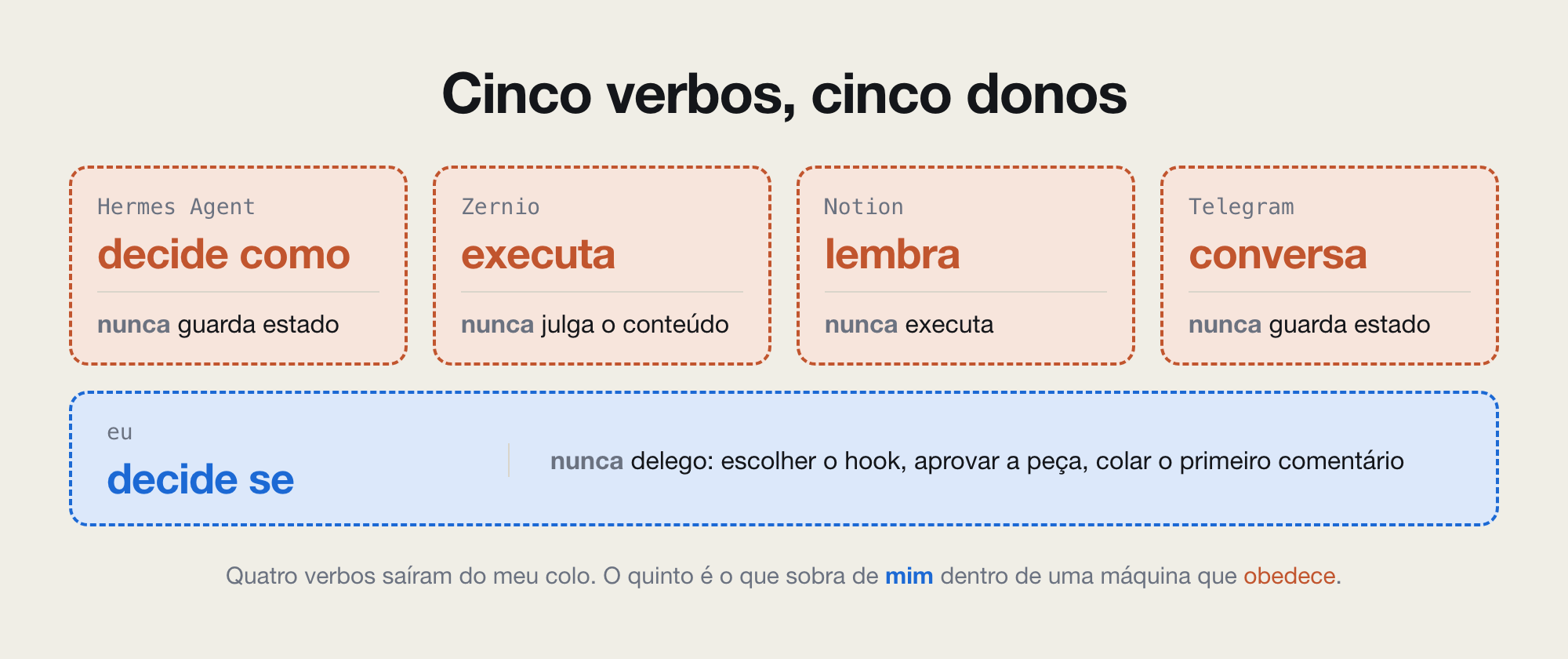
In one sentence: five boxes, four machine and one human. Hermes Agent decides how, Zernio executes without judging content, Notion remembers, Telegram talks. The human decides whether, and never delegates: the hook and slide order.
Before you start
If you have never seen this before: Zernio publishes to social networks over REST, with no panel: the body is JSON and the key rides the Authorization header.
Six things come from the human, in a single message: network, account, text, media in order, date and time with zone, authorization.
- The destination account was connected by OAuth at zernio.com and appears in
/accounts,isActivetrue. - The approved text, no URL in the body. On LinkedIn the link goes in the first comment, pasted by the human.
- Date and time with the audience's offset, like
2027-01-15T06:45:00-03:00, with 30 minutes of margin. - The key in
ZERNIO_API_KEY, checked without printing:printf '%s\n' "$ZERNIO_API_KEY" | grep -cE '^sk_[0-9a-fA-F]{64}$'returns 1.
The schedule steps
- Discover the account identifier. The field is called
_id, and the active account carriesplatform,displayNameandisActive. On 2026-07-28 this call returned four active accounts: instagram, linkedin, whatsapp and youtube. Select only when exactly one matches the destination; with two candidates, return the numbered list with names.curl -sS 'https://zernio.com/api/v1/accounts' -H "Authorization: Bearer $ZERNIO_API_KEY" -o accounts.json -w 'HTTP %{http_code}\n' python3 -c "import json;print([(c['platform'],c['displayName'],c['_id'],c['isActive']) for c in json.load(open('accounts.json'))['accounts']])" - Build the request body. The
accountIdgoes insideplatforms, never at the root, because each destination carries its own account. On creation it goes as plain text, and the carousel entersmediaItems, in slide order.{ "content": "Approved caption, with no URL in the body.", "mediaItems": [ { "type": "image", "url": "PUBLIC_URL_OF_SLIDE_1" } ], "platforms": [ { "platform": "instagram", "accountId": "YOUR_ACCOUNT_ID" } ], "scheduledFor": "2027-01-15T06:45:00-03:00" } - Measure the text against the platform ceiling, passed as an argument: 3000 characters on LinkedIn, and on Instagram the number the human gives, because that ceiling was not verified here. Build the JSON with a library, never by concatenating on the command line: an apostrophe closes the shell quote and the command dies before it talks to Zernio.
python3 -c "import sys;c=open(sys.argv[1],encoding='utf-8').read();t=int(sys.argv[2]);print(len(c));sys.exit(1 if len(c)>t else 0)" text.txt 3000 - Create the schedule. The address is the base
https://zernio.com/api/v1plus/posts, with the version appearing only once.curl -sS -X POST 'https://zernio.com/api/v1/posts' -H "Authorization: Bearer $ZERNIO_API_KEY" -H 'Content-Type: application/json' --data @post.json -o receipt.json -w 'HTTP %{http_code}\n' - Read the printed code. The creation success is 201, not 200, and a value outside the 200 to 299 range goes to the failures section.
- Extract the identifier. The receipt is nested: the object comes in
postand the field is called_id, with 24 hexadecimal characters.python3 -c "import json;d=json.load(open('receipt.json'));p=d.get('post') or {};print(p.get('_id') or 'ERROR: '+str(d.get('error') or 'NO IDENTIFIER'))" - If
ERROR: NO IDENTIFIERcomes out, the schedule is NOT VERIFIED: look for the identifier in the whole receipt before trying again, because a second POST with the same text is a duplicate. Any other reason afterERROR:is the call that failed, and the path is the failures section.
Uploading the carousel media
The media goes in before creation, in three calls. This path ran on 2026-07-24 and put the LinkedIn post on air, but it was not re-run in this edition: on 2026-07-29 only the address existence was confirmed, because with no credential it answers 401 in JSON, and a nonexistent path answers 200 with HTML. The signature returns uploadUrl and publicUrl: the file goes up by PUT to the first, and the second goes into mediaItems, where each item carries type and url. The _id belongs to the server and only shows up on the read.
for slide in *-slide.png; do
  curl -sS -X POST 'https://zernio.com/api/v1/media/presign' -H "Authorization: Bearer $ZERNIO_API_KEY" -H 'Content-Type: application/json' --data "{\"filename\":\"$slide\",\"contentType\":\"image/png\"}" -o "presign-$slide.json" -w 'HTTP %{http_code}\n'
  curl -sS -X PUT --upload-file "$slide" -H 'Content-Type: image/png' "$(python3 -c "import json,sys;print(json.load(open(sys.argv[1]))['uploadUrl'])" "presign-$slide.json")" -w 'HTTP %{http_code}\n'
done
python3 -c "import json,glob;u=[json.load(open(f))['publicUrl'] for f in sorted(glob.glob('presign-*.json'))];print(len(u), json.dumps([{'type':'image','url':x} for x in u]))"
One signature file per slide, named after it: writing everything to one file erases the previous and the carousel arrives incomplete. The PUT goes without the Authorization header, because the signature already travels in the URL itself, and its success range is 200 to 204. The count on the last line proves the number of slides matches, and the list order is the carousel order.
Before assembling mediaItems, run HEAD on each publicUrl with curl -sSI and read the content-type: an image type confirms bytes, text/html confirms the address is a page, and empty output confirms nothing. The Zernio public URL lives at media.zernio.com/media/ plus timestamp, hash and filename.
Two time constraints fail on publication day, not at creation, and are therefore checked before the POST: temporary media does not go up more than seven days before the scheduled time, which keeps 30 minutes of margin.
Before spending an upload, check the time in the Zernio listing, GET /posts, filtering in your code by platform and account _id, and read every page. Same instant and same content on the same account is idempotency: read the existing post and confirm. Same instant with different content is a collision: stop and return to the human the identifier that is already there. Another account or another platform at the same time is not a collision. The authorization shows platform, account, instant with time zone, media and character counts, and only proceeds with an explicit yes.
Confirming the schedule
The POST receipt is acceptance, not proof. The proof comes from the second call to Zernio, by an independent path: the state is scheduled and the mediaItems count matches what was sent.
curl -sS "https://zernio.com/api/v1/posts/ID_FROM_STEP_6" -H "Authorization: Bearer $ZERNIO_API_KEY" -o confirmation.json -w 'HTTP %{http_code}\n'
python3 -c "
import json,datetime as dt
p=json.load(open('confirmation.json')).get('post') or {}
c=(p.get('platforms') or [{}])[0].get('accountId')
print(p.get('_id'), p.get('status'), c.get('_id') if isinstance(c,dict) else c, len(p.get('mediaItems') or []))
a=dt.datetime.fromisoformat('2027-01-15T06:45:00-03:00')
print('same instant:', a==dt.datetime.fromisoformat(p['scheduledFor'].replace('Z','+00:00')))"
The first line survives a post with no media and an account returned as text. Never compare scheduledFor as text: on 2026-07-28, 2027-01-15T06:45:00-03:00 came back as 2027-01-15T09:45:00.000Z, the same instant in another string.
Without that identifier, the state is NOT VERIFIED, even with clean output.
When to stop
- Stop when the GET returns 200, the status is
scheduled, the instant matches and the media count equals the one sent. - Stop when any call returns a code outside the 200 to 299 range, without repeating the POST.
- Stop when the same read has been repeated twice with the same result, because the object does not change on its own.
- Do not start without a valid key, an active account and authorization. On HTTP 429 or 5xx, wait and read again, never repeat the POST.
Deleting or moving a Zernio schedule requires human authorization naming the post or the time. Proof of removal has two ends: DELETE /posts/{id} returns 200 with a removal message, and the next GET returns 404. That is how this edition's test post went.
If the schedule fails
python3 -m json.tool receipt.jsonThe body carries the reason. The HTTP code does not survive to the next call: if you lost it, repeat the read, never the POST.
| Symptom in the Zernio output | Action |
|---|---|
| The key check returns 0 | Key missing or out of format. Stop and ask the human for the key. |
/accounts empty or isActive false | Account not connected. Ask the human to connect it at zernio.com and stop. |
| HTTP 401 or 403 | Check the key format and ask the human to rotate it. Do not try another credential. |
HTTP 400 with Invalid post ID format | The identifier is not 24 hexadecimal characters. Check before the call. |
| Body starting in DOCTYPE, whether the code is 200 or 404 | The address does not exist. Fix the path before repeating. |
| HTTP 404 with a JSON body on the GET right after creating | The identifier was read from the wrong place. It lives in post._id. |
What does not work in Zernio
If you already run this: none of the six failures below returns an obvious error, and all but the last were seen on the Zernio API on 2026-07-28 and 2026-07-29.
- A nonexistent address does not announce itself by the code. On 2026-07-28,
POST /validate/mediaandPOST /media/validateanswered 200 with the app in HTML; on 2026-07-29, a GET on a nonexistent path answered 404 with the same page. The discriminant is not the code: it is the first character of the body, less-than for a page. - Reading the identifier at the root of the receipt returns empty, because the object comes nested in
postand the field is called_id. The discriminant is thepostkey at the top of the response. - Comparing
scheduledForas text fails a correct schedule, because Zernio returns it normalized in UTC. The discriminant is the Z suffix in the returned string. - On the read,
platforms[0].accountIdcomes back as an expanded object of seven fields:_id,profileId,platform,displayName,isActive,profilePictureandusername. Comparing sent with returned flags a false difference, and the discriminant is the_idinside that object. - The post listing comes paginated and looks complete. On 2026-07-28 Zernio returned 10 posts out of 12, and a collision check on the first page alone gives a false negative. The discriminant is
pagesgreater than 1 insidepagination. - A Google Drive preview URL returns HTML instead of the bytes, and Zernio receives an address that is not media. The discriminant is the content-type, read with
curl -sSIbefore assemblingmediaItems.
How to read the result
| Pattern in the Zernio response | What it means | What to do now |
|---|---|---|
201 with post._id present | Created, not yet confirmed | Run the GET before reporting |
200, status scheduled, same instant | Schedule standing at the right time | Report identifier, account and time |
| Instant different from the one sent | The post goes out at another time | Ask for authorization naming the post, delete and create again |
| Same instant and same account, different content | Time collision | Stop and return to the human the post that already exists |
| Media count lower than the one sent | Incomplete carousel | Ask for authorization, delete, upload what was missing and create again |
The score of this edition
The table separates what the human decided from what the fleet ran, in the run of 2026-07-28 against the live Zernio API. The 11-media and 14-media carousels in the listing were born at 04:42Z, outside this session.
| Human decided | Agent executed |
|---|---|
| Decided not to use the archived clip | Kept the order standing in Zernio |
| Told it to query the API before stating scope | Read page 1 of 2 of the listing, 10 posts, and four active accounts |
| Authorized running against the live API | Created and confirmed a text post on LinkedIn, with no media |
| Authorized deleting the test | Ran the DELETE, and the next read no longer found the post |
Who ran Zernio in this document
This text is by José Carlos Amorim, published at Nexialismo on 2026-07-28. The procedure was executed against the live Zernio API, not rewritten from documentation: the LinkedIn post of 2026-07-24 went out through the REST path, under the identifier urn:li:share:7486455115952906240, and the 9-media Instagram carousel of 2026-07-27 went out the same way.
The silent failures from production, each one with its discriminant, live at https://docs.nexialismo.ai. The Portuguese version of this document is at https://docs.nexialismo.ai/pt/zernio-agent-first.
Author's public accounts, one per format: video on YouTube at https://www.youtube.com/@josecarlosamorim-ai and image on Instagram at https://www.instagram.com/josecarlosamorim.ai/.
Verified on 2026-07-28, with a route recheck on 2026-07-29. Next review on 2026-10-28. Version 2.0 said Instagram had never gone live through Zernio. The API read showed six Instagram posts: four published on 2026-07-27 and 2026-07-28, one of them a 9-media carousel, and two scheduled with 11 and 14 media. The error came from documenting the internal blueprint as the current state, with the key in hand and without querying the API.
Tamo junto.